Getting started with Brainmondo® is quick. Download the app, choose your access and activate it with a code. You can also try it for free – one exercise a day, with no commitment.
Your system is your system
Download for your system nowWe couldn’t detect your system – please choose one of the three platforms below.
Available on all three platforms. Scan the QR code with your phone or tap the button.
Choose the option that suits you best. You can pay by card or bank transfer.
💳 Payment is secure – you can pay by card or bank transfer.
📩 Your receipt and activation code will arrive as soon as you have paid.
You will receive your activation code once you have paid – you will find it on your invoice. Activating the app then takes just a moment:
Open Brainmondo on your phone, tablet or computer.
You will find the activation section at the top of the app (a green or red padlock icon, or a + sign).
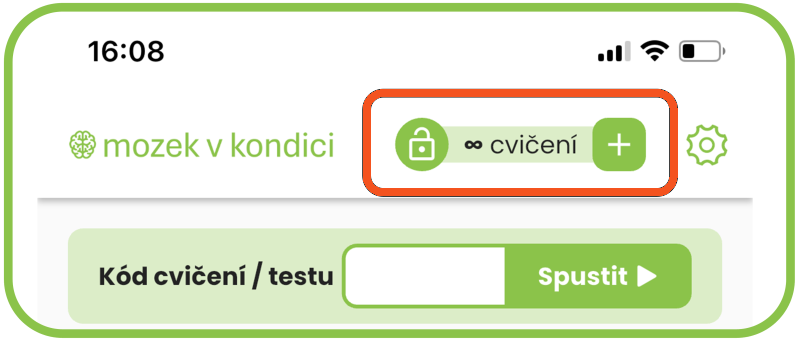
The code is shown on your invoice.
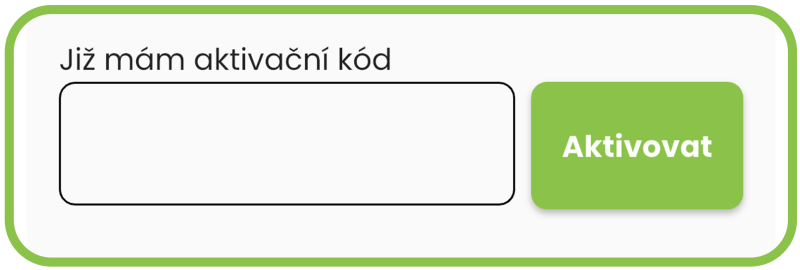
Done – you have unlocked full access to all exercises and tests.
Don’t have a code yet? Choose your access in step 2 and your code will arrive on your invoice.
If you train regularly for a year – 20 minutes twice a day – and after that year (10–13 months) you tell us that Brainmondo® has not helped you, we will give you your money back in full.
Both licences are valid for one device. An annual licence can be used for one year on the device where it was activated. A lifetime licence lasts for the whole life of the device.
Although the number of exercises is fixed (1,121), the possibilities are unlimited, because new questions are picked at random every time. So when you repeat an exercise, it always looks different from your previous attempt – while the level of difficulty stays the same.
Brainmondo is for everyone, whatever your starting point. Our exercises cover a wide range of difficulty – from very gentle, simple tasks for rehabilitation and stimulation to highly demanding challenges for those looking for intensive mental training. Simply choose the level that suits you.
You can repeat the standard exercises again and again. For the special tests (screening) and questionnaires, it is best to wait a month before repeating them.
No – there are many more! 🚀 700 was just the beginning (September 2024). In January 2025 ⚡there were 835 exercises, and by October 2026 there were already 1,121 👍. We add new tests and tasks every week, so the content keeps growing. In fact, you get far more practice for your money than we advertise.
The app has 16 categories:
You will find the activation code on the invoice you receive after paying for your order. Then enter the code in the app exactly as described on this page.
If your proof of payment hasn’t arrived, please also check your Spam folder, or your Junk or Promotions folder. The email may have been moved out of your main inbox automatically.
You will find the activation code on your invoice.
In the app, enter it in the “Full access, Activation” section.
Just click the “padlock” icon or the “+” icon at the top of the screen and enter the code in the window that opens.
⚠️An activation code can only be used once.
An activation code can only be used once. Before resetting your device to its factory settings, you must first make a backup (ideally after you have activated the app).
If you get a new device, you need to transfer all your apps and data to it.
⚠️Brainmondo does not register or track your devices, so making a backup is essential. We are unable to restore a licence you have bought.
Unfortunately not – we only accept payment by card or bank transfer.
But there is an easy solution: ask a family member or friend to pay for the subscription for you. It only takes them a few minutes and makes no difference to you – the app will still be yours.
Before you buy, you can try the app on your own device for free, with no commitment. You get 5 tests of your choice, plus 1 free test every day. That way you can easily check not only that the app works on your phone, tablet or computer, but also how to use it and how it works. We recommend trying the app before you buy.
The difference is when you find out your result.
In an exercise you get instant feedback – straight after each question you see whether your answer was right or wrong. So you can learn from every answer as you go and carry on.
In a test, nothing is marked along the way. You answer all the questions one by one, and only at the end are your answers marked together and you see your overall result.
That is why exercises are ideal for everyday training and learning, while a test measures how you are really doing – because you are not influenced by how you did on earlier questions.
You are probably using a smartphone with a very large text size. On a phone, the app can only adapt to this size up to a point. Try making the text smaller in your phone’s settings, or use a tablet or computer for the exercises instead.
Your smartphone probably has a very large text size. The app can only adapt to this size up to a point. However, when you enter a code, it doesn’t matter if you can only see part of it – the exercise will still start. If this isn’t convenient for you, try making the text smaller in your phone’s settings, or use a tablet or computer for the exercises.
Can’t find your answer? Write to us.
Download Brainmondo for free and try one exercise a day with no commitment. You can unlock full access whenever you like.
Download for free